Highest Quality Services
from the Company that Invented Cryonics.
Our founder, Professor Robert Ettinger, invented cryonics in 1962 and started the Cryonics Institute in 1976. We pioneered the cryonics process, vitrification formula and other core fundamentals that still shape the cryonics industry of today.
Cryonics Institute Membership
Joining is the first step to your cryopreservation
Member-only Services
To contract services you must join first. CI services are exclusively for our members.
Contracting for Services
Membership is an independent fee and does not include the cost of cryopreservation services. Members must contact CI Headquarters to contract these services, which require additional forms and payment.
Additional Benefits
- Personal one-on-one support throughout your cryonics journey
- Special discounted rates for additional family memberships
- The Cryonics Institute is a non-profit organization owned and operated by its members
- Quarterly Newsletter
- Members-Only Discussion Group
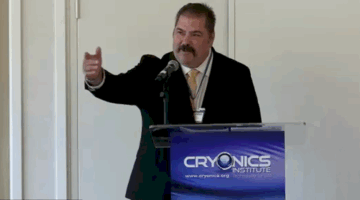
- Annual General Meeting
- Facility Visits and Tours
- Voting rights*
- Ability to run for Board of Directors*
* Only for members with funded Cryopreservation contracts.
Membership Pricing
| MEMBERSHIP | INITIATION | |
|---|---|---|
| LIFETIME: | $1,250 (single charge) | NONE |
| ANNUAL: | $120 per year (recurring) | +$200 (single charge) |
| QUARTERLY | $35 per quarter (recurring) | +$200 (single charge) |
Cryonics Services
Human Cryopreservation
$28K-$45K*
Industry-leading cryonic preservation includes your own dedicated Membership Specialist who will help you through all your sign-up options, contracts, funding and everything you need to do to be cryopreserved at CI. The cryonics process includes preparation, controlled cool down and indefinite storage at cryonics temperatures of -196 degrees Celsius (-320 degrees Fahrenheit) using liquid nitrogen.
The base cryopreservation cost does not include standby (the process of initial preparation for transport to CI performed at the site of death) or transport costs and arrangements. We do provide a paid Professional Standby and Transport option that we can contract for you through our third-party standby provider Suspended Animation, Inc. for an additional fee.
Contact us immediately if you have an urgent human or pet cryopreservation emergency. Note however that not all last-minute cases can be accommodated.
LEARN MORE
HOW TO PAY FOR CRYONICS WITH LIFE INSURANCE
Cryopreservation Pricing
| HUMAN CRYOPRESERVATION | MEMBERSHIP | |
|---|---|---|
| LIFETIME MEMBER: | $28,000 (does not include Local Help) | $1,250 (single charge) |
| ANNUAL MEMBER: | $35,000 (does not include Local Help) | $120 per year (recurring.) (+ one time $200 membership initiation fee if applicant is a new member) |
| NON-MEMBER/POST-MORTEM: | $45,000 (does not include Local Help) | Pending acceptance $1,250 |

Professional Standby & Transport Option
“Standby” is the process of having a team bedside to perform cryonics preparation immediately following the legal death of a person signed up for suspension. When the time comes for you to be preserved your standby contractor will send a trained team to your location to be on standby, ready to prepare your body for the cryopreservation process and transport to CI. Professional standby services are contracted with our third-party provider Suspended Animation Inc.
$60,000 – $78,000*

Local Preparation & Transport Option
If you are not using a Professional Standby provider, you will have to make arrangements to have your body prepared locally on-site and transported to the Cryonics Institute. Usually this is arranged through a funeral director who has the necessary equipment, licenses and experience.
You can also contact an independent local or regional cryonics support group who can often provide further assistance and in some cases, local standby services and help arranging and expediting transport.
$10,000 – $20,000*

Personal Notification Tools and Standby Training
CI provides instructions and emergency notification tools for members and non-member cryonicists alike who choose to set-up their own standby arrangements. CI’s tools provide for critical early notification and advanced planning options which can significantly improve your suspension outcome. An individual standby operation can be further supplemented by working with independent local or regional cryonics standby groups.
FREE – $40.00*

Pet Preservation
Don’t give up on your beloved pet at the end of their life.
Pet preservation costs are based on the size and weight of the pet and do not include transport costs.
$1,000 – $28,000*

DNA & Tissue Preservation
CI provides a medical grade sample collection kit, collection instructions and indefinite cryonics storage at our facility for four small samples (1.8ml). For larger samples please contact us for a quote.
$98.00*
QUESTIONS? Call us at 586-791-5961
email info@cryonics.org or fill out our Contact Form
FUNDING CRYONICS
Funding with LIFE INSURANCE is more affordable than you think.

LIFE INSURANCE is the most popular method of funding a cryopreservation contract. Members acquire a life insurance policy sufficient to cover the contract cost and individual funeral director and transport costs or professional standby fees and name the Cryonics Institute as the beneficiary. Most members usually overfund their policies for various reasons including a donation to support the strength and longevity of the organization.
CRYONICS SPECIALTY LIFE INSURANCE PROVIDERS
See the above link for a list of third-party insurance agents who specialize in and have experience setting up policies to fund cryonics contracts.

LIFE IS PRICELESS
Imagine a world free of disease, death and aging. At the Cryonics Institute, we believe that day is coming and cryonics is presently our best chance of getting there. Our mission is to extend human lifespans by preserving the body using existing cryogenic technologies – with the goal of revival by future science. But will it work? Research makes a powerful case for cryonics. Get the facts and decide for yourself.
ABOUT THE CRYONICS INSTITUTE
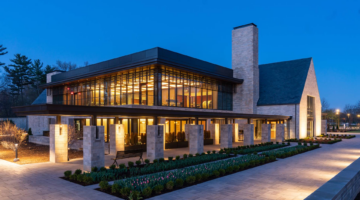
The Cryonics Institute provides suspension at cryogenic temperatures also known as cryonics. We provide long-term storage and security for members at our cryonics facility in Clinton Township, MI. We specialize in full-body cryo-preservation of humans and pets, DNA & tissue storage as well as cryonics outreach and public education about the cutting edge science we are engaged in. Members are afforded the opportunity to be preserved at cryogenic temperatures in hopes that future medical technology may be able to someday revive and restore them to full health.

EVERY SECOND COUNTS:
EMERGENCY SITUATIONS
Successful cryonic suspension requires immediate action after legal death in order to optimize the preservation of still-living cells. Be prepared for the most critical moment in the cryonic process by reviewing these essential references:
A Member Owned and Operated Non-Profit Organization
As a member, you will be one of the owners and operators of the Cryonics Institute, as we are wholly owned and operated by our membership. CI is run by a Board of Directors elected exclusively from our members, by our members – so we have no outside investors, managers or other parties dictating our operations. Our responsibilities are to our patients, our membership, and to advancing our founder Robert Ettinger’s vision.
LEARN MORE
What is Cryonics?
Browse our video library to learn more.
Why Choose Cryonics?
The Cryonics Institute offers a potential “ambulance ride” to the high-tech hospitals we hope to see in the future.
When present medical science has given up on you or your loved ones, we seek another solution.
The choice is yours – Do you take the chance at life?
Envision a Brighter Future
If cryonics is successful at preserving and reanimating people at some future date, it opens a world of possibilities:

Another Chance at Life
Cryonics could offer the chance to live a renewed life in the future.

Witness the Future
If reanimation is successful, we could experience all the incredible things to come.

Live an Extended Lifespan
The possibility of an unlimited lifespan to live all your dreams.

Renewed Youth and Health
The potential to stop or even reverse the aging process.

Reunite with loved ones
A possibility to start anew with your loved ones, children and grandchildren.

New Life for a Beloved Pet
Preserve a beloved pet for potential revival.

Future Cures for Today’s Diseases
Future medicine could eliminate debilitating and fatal diseases to significantly improve quality of life.

Organ Preservation
The cryonic technique of vitrification seeks to achieve preservation and transplant of vital organs.

Preserve Endangered Species
Cryonic science has the potential to preserve or revive endangered or extinct species.
LATEST NEWS